Amazon sourcing tool
SellerAMP: reviews, pricing and tutorial 2026
Before you buy stock, you want a simple answer: does this product sell, are you eligible to sell it, and does the margin really hold up? SellerAMP helps you check all three quickly.
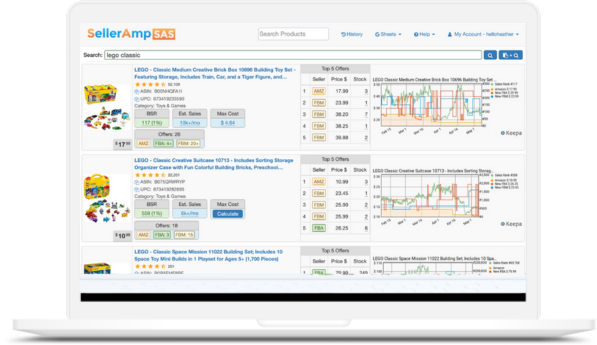
What is SellerAMP for?
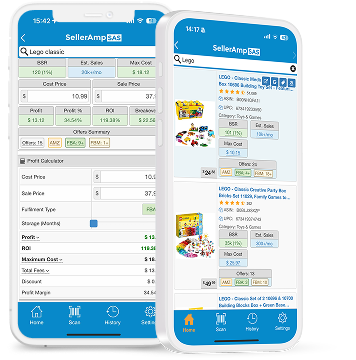
SellerAMP SAS is an analysis tool for Amazon sellers. It is available as a Chrome extension, mobile app and web app. Use it when you have identified a product and want to decide whether it merits deeper analysis.
- Can I sell it? Eligibility, restrictions, and alerts to check before ordering.
- Does it sell? Price, offers, Buy Box, history, and product dynamics.
- Is it profitable? Fees, taxes, purchase cost, profit, and ROI based on your settings.
How to use SellerAMP: interface, settings and marketplaces
1. Translate the interface
In Chrome, enable French page translation. You can read the panels without losing the meaning of the essential data.
2. Keep the useful terminology
Profit = estimated profit. ROI = return on investment. Fees = fees. Eligibility = ability to sell.
3. Set your thresholds
Enter your costs and objectives. The same product may or may not be worthwhile depending on your purchase price, VAT model, and minimum margin.
Tutorial: analyze a product in 5 minutes
1. Start with the actual product
Open the Amazon listing or the supplier page. With the Chrome extension, run the analysis on the ASIN or the product in question.
2. Check eligibility before anything else
If you cannot sell the product, or if an alert needs checking, stop there. An attractive ROI does not make up for a product that cannot be listed with confidence.
3. Enter your purchase cost
Enter the price you actually paid, including the discount, supplier shipping, any fees, and VAT terms. This is what makes the profit calculation meaningful.
4. Read the market, not just the displayed price
Look at the number of offers, seller types, the Buy Box, price changes, and history. A high price today does not by itself tell you how long it will hold.
5. Decide using your own thresholds
The right product is not the one showing a green number. It is the one whose margin, ROI, sales velocity, and risk level fit your method.
What to review before buying
- Actual purchase cost
- Estimated net profit
- ROI based on your objective
- Eligibility and restrictions
- Number of sellers
- Price and Buy Box
- Product history
- IP alert or sensitive product
SellerAMP, Keepa, Helium 10: which one should you use?
| Tool | When it becomes useful | What it gives you |
|---|---|---|
| SellerAMP | When you are analyzing a sourcing opportunity. | A centralized view of eligibility, profit, ROI, offers, and product signals. |
| Keepa | When you want to understand the history. | Changes in price, rank, Buy Box, and number of offers over time. |
| Helium 10 / Jungle Scout | When you are also working on product research, catalog, or brand. | Broader features that are useful depending on your Amazon model, but different from making sourcing decisions product by product. |
For arbitrage, the tools complement each other: SellerAMP gives you a quick read on the opportunity; your analysis must then confirm the reality of the market and your costs.
Features to know when you are getting started
SellerAMP brings together profit and ROI calculations, fees, offers and stock, Buy Box analysis, price and sales charts, IP alerts, variations and analysis history. The tool supports European marketplaces including Amazon UK, France, Germany, Italy and Spain.
The key is not to chase features: start by mastering a clear validation method, then use the panels that truly support your decision.
Frequently asked questions about SellerAMP
Is SellerAMP useful for Amazon sellers?
Yes, the tool supports the French marketplace among European marketplaces. Your settings, costs, and VAT framework remain crucial for interpreting the calculations.
Can you try SellerAMP for free?
SellerAMP currently offers a 14-day free trial. Offers and terms may change: check the trial page when you sign up.
Does SellerAMP replace Keepa?
No. SellerAMP uses historical data, among other things, to help you decide; Keepa remains a benchmark when you want to read the charts in detail.
What is the difference between profit and ROI?
Profit is the estimated gain in euros or dollars. ROI measures that gain against your purchase cost. The two should be considered together.
A tool saves you time. A method helps you avoid bad purchases.
SellerAMP is one step in the process. To do arbitrage consistently, you also need to know what to check before adding to your cart: offer, price, fees, risk, sales velocity, and capital tied up.